
The 5 Most Essential Plugins For Your WordPress Website

One of the best things about having a WordPress website is the astonishing level of customisation you can achieve to your website through plugins. Practically anything can be done! The WooCommerce plugin allows any WordPress theme to seamlessly become an online store. Translation plugins can turn any website multilingual. Job search plugins such as WordPress Job Manager can transform the functionality of your recruitment website. I could go on.
It’s easy to forget that most CMSes don’t offer anywhere near the same level of customisation as WordPress does – or at least, not without paying through the nose to achieve it. This is one of several reasons we often recommend WordPress to our clients who want a new website build.
The way we often describe WordPress and its plugin system to our clients who might not have experience of it is that it’s quite similar to having a fresh smartphone install, with bog-standard functionality. Plugins function like apps on your phone – they widen the core functionality of your install and broaden the possibilities for your website.
The temptation is often there to download as many plugins as possible, assuming that an all-singing, all-dancing website will be exactly what is needed to set your business apart from your competition. However, with plugins, a ‘less is more’ approach is definitely advised.
Plugins are often very memory-intensive on your website’s server, which can slow your site down; no bueno for SEO (take a look at our guide on speeding up your website for more tips on similar lines). Adding new third-party plugins can increase the risk of hackers getting into your site, too, due to exposed vulnerabilities in the code – this is particularly so for plugins that aren’t frequently updated (sadly, hackers are updating their underhanded methods all the time, so plugins need to keep pace).
With that being said, let’s take a look at our most highly recommended plugins for most WordPress websites, which we think are highly reliable and offer unmissable functionality.

1. WORDFENCE SECURITY
The Alpha and Omega of WordPress plugins; WordFence Security is always one of the first plugins installed on every new WordPress site we roll out for our clients. WordFence is basically the equivalent of paying a full-time security team to monitor your property (in this case, your web property) – and then bolting your industry-grade composite door and buying a particularly scary-looking guard dog to boot.
It’s hardly the most glamorous of plugins to kick off our list with, we’ll grant you that – but look, we’re talking about the most essential of plugins today, and it doesn’t get much more essential than website security. If you’ve ever had the misfortune of having your website hacked, you’ll catch our drift here. WordFence does the leg-work your site needs, and it does it very, very well.

3 Million + WordPress webmasters can’t be wrong – can they?
One of the best things about WordFence is that when it’s installed, it needs virtually no maintenance. As you install the plugin, you’ll be prompted to enter an e-mail address. If ever there should be an issue or something else that needs your attention – for example, a plugin that needs an update (this can be a security risk), or a login attempt from an unrecognised location – you’ll be notified, right there in your inbox.
Unlike the vast majority of other plugins, you don’t even need to run manual updates on this bad boy! Just set the plugin to auto-update once you install it on your domain.
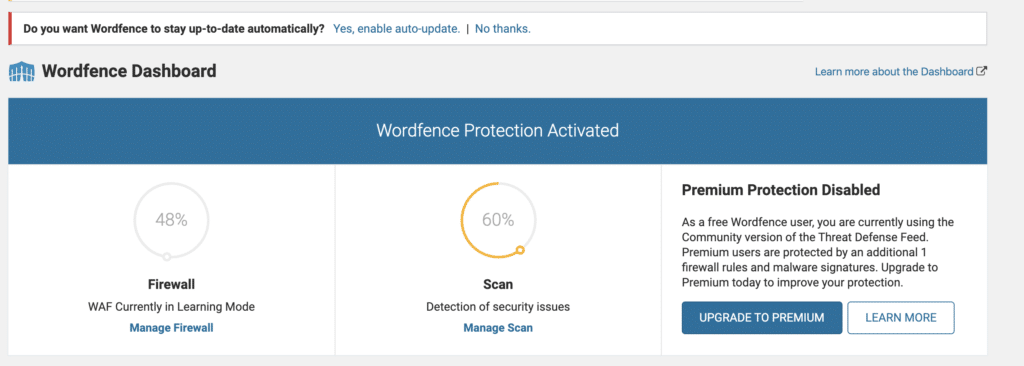
The option at the top allows you to set-up automatic updates for WordFence, which means it’ll always be up-to-date. You can also spot the Firewall here. This starts off in an AI-powered Learning Mode where WordFence picks up useful insights about who needs to use your domain (and who doesn’t), and flags any threats to your site security.
The plugin will frequently scan your website, looking for newly-reported vulnerabilities in your plugins and other files, and letting you know where things aren’t well-optimised for keeping your web property safe. This might be things like updating a plugin (if available) or deleting it from your domain and looking for a replacement (if it’s not). Or, if your site has only a small number of admins who use it regularly, it might tell you to enable ‘Brute Force Protection’, a method to stop hackers having multiple guesses at your username and password to access your domain.
This sort of advice is invaluable, and it’s usually based on the magic of Artificial Intelligence – WordFence spots the issues on your domain and lets you know how to deal with them in the best possible way.
There’s really very little that you need to do to get the benefits from WordFence, and that’s part of why we love it so much.
There is a premium version for the plugin, but really, unless you’re running an extremely busy, high traffic website, or one that’s well-known enough to be especially vulnerable (well done you, in both cases!), for most people there will be no need to make the upgrade.
A worthy entrant on our list.
2. YOAST SEO
At Saint Digital, we’re pretty big advocates of taking the time to invest in good SEO for your website, so we couldn’t go without mentioning a good all-round optimisation plugin here. It’s simply rather pointless making the investment in a stylish design, if you’re not generating much organic traffic from search engines.
Nowadays, there are many plugins jostling for position as the leader of the pack for WordPress SEO plugins, and nowadays they all meet a good standard of usability and function. But, for our money, there’s no toppling Yoast SEO.
It’s in the fundamentals that Yoast SEO truly excels, giving someone with no prior background in SEO the tools they need to structure their website for best visibility on the SERPs (Search Engine Results Pages).
Yoast gives you the ability to customise the metadata (the bit that appears in Google’s listings) of every post and page of your site, where you’ll be able to choose a ‘focus keyphrase’ – the main phrase that you’d like your page to target in search engine results page, ensuring that you include content referencing the key phrase in all the most important pages.
All you need to do is install the plugin, and Yoast SEO will insert itself niftily beneath the Content box where you’d usually add your Page and Post content. If nothing else, it’s a handy reminder that every single thing you create online should have its own SEO priorities!
Here’s an example for our homepage, where we’re targeting our brand searches: ‘Saint Digital’.
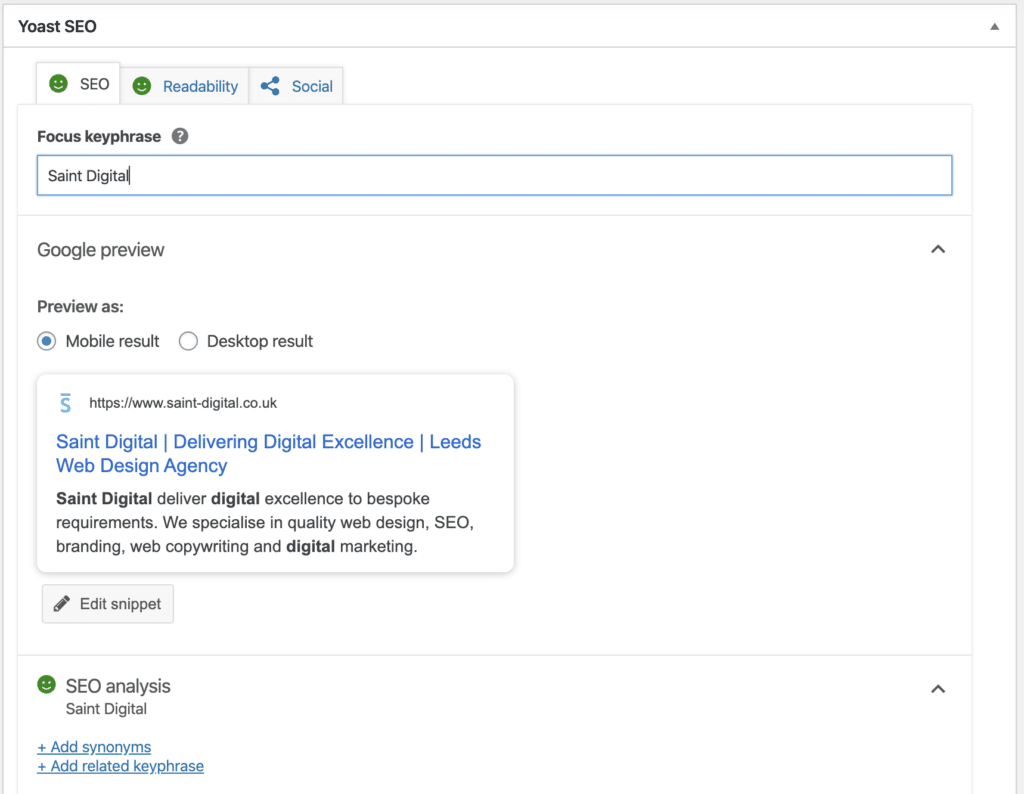
The tool will give you tips on where it thinks you could improve your Post or Page – both from an SEO and a readability perspective. This is invaluable, because the better and more readable your content, the higher you will rank – user engagement (such as how long your typical visitor spends on your site) is an increasingly important ranking metric.
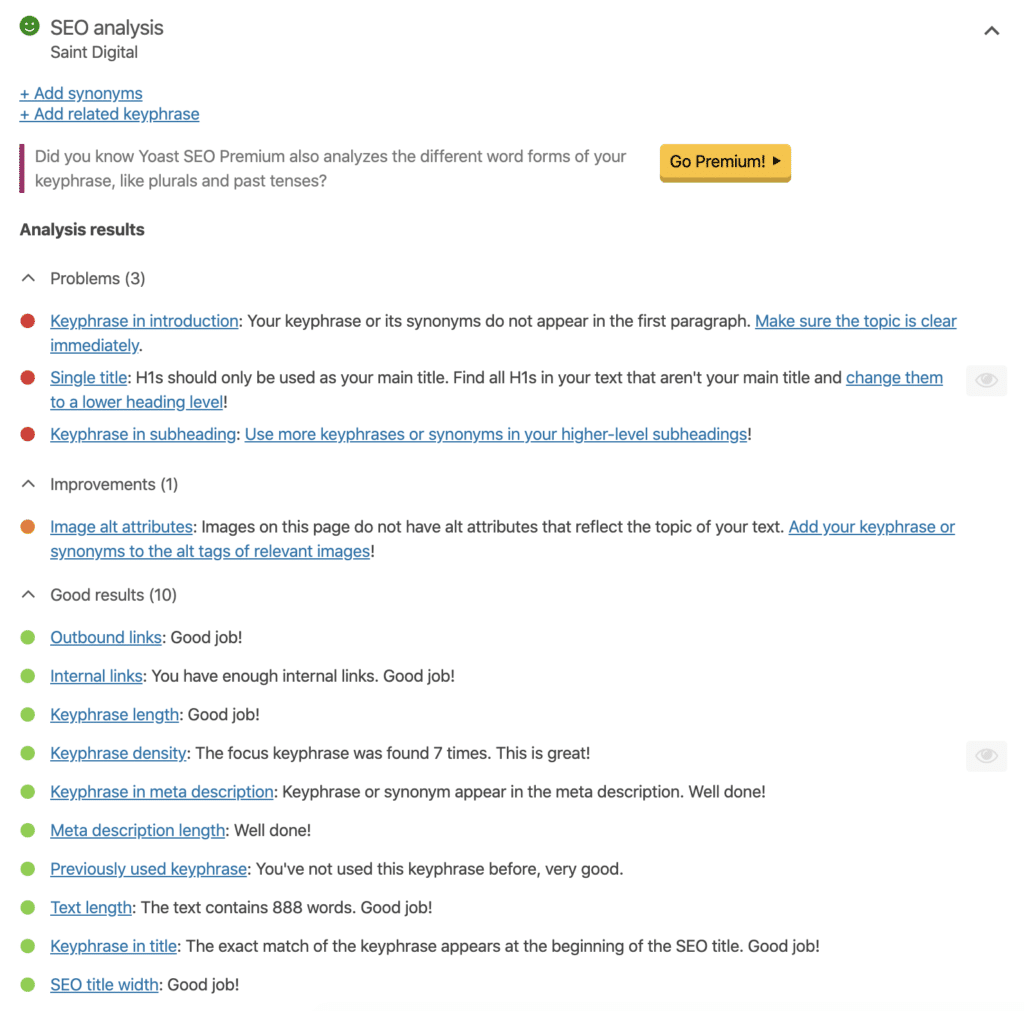
We had a bit of work to do, here and there… *ahem*
Along with this, Yoast can also help you do everything else you might need to do from an SEO perspective. Redirect your search equity (determining your rank) from a former website domain to your new one? Check. Inform Google to crawl (or not to crawl) a page? No problem. Set a default metadata template for all new Posts and Pages, ensuring coherence across the site? Of course!
All of this makes Yoast our essential recommendation for optimising your WordPress website for search engines.
Yoast do offer a premium version, as many plugins of their calibre do. With it, you can optimise for keywords and their synonyms at the same time, and also take a look at how you’re optimised for Facebook and Twitter sharing too. There’s a Redirect Manager, through which you can easily point old URLs to new ones, avoiding visitors seeing 404 (Page Not Found) errors on your site. There’s also some nifty ways to check the finer details of your SEO optimisation, too, such as the ability to list your top 5 used words or phrases on your page, to see how it aligns with your chosen keywords.
This stuff isn’t bad at all, and if you know what you’re doing, can be more than worth your investment.
But, for most people, the free version should give you what you need to get started with SEO.
3. W3 TOTAL CACHE
There are two big dogs in the caching plugin world – WP Super Cache and W3 Total Cache – but this town only has room for one sheriff. We think W3’s offering is slightly more user-friendly than the alternative, and requires less configuration – that’s enough to clinch it the nod for our humble list.
But hold your horses, there, pard’ner (OK, we’ll stop with the whole cowboy thing…) – what even is a caching plugin, and why do you need one?
Caching is quite a complex technology, so we’ll save you from a highly technical explanation. But it has one key benefit – it can make your website much faster. That, in turn, benefits your SEO, because a highly important ranking factor is the speed your site takes to load up from the moment someone clicks it in the search engine results page.
The average web page on the Net requires users to download 2.2MB worth of data – usually stuff like images, videos, scripts and fonts. The size of websites is only trending upwards, as sites get more and more fancy and host an increasing volume of content.
That’s where caching plugins come in. They store data that’s frequently accessed in a little store that the web browser can re-use without having to fully reload it – that’s called a cache.
Because all caching plugins basically do the same job, you only need one. We favour W3 because (in our humble opinion) it’s the easiest to set up and maintain. To get the most out of W3, you’ll probably want to benchmark your site speed (you can use a free tool like Google’s PageSpeed Insights as a reliable guideline) and then measure the results afterwards. Most people will notice a quite significant page speed improvement.

The mass of options that you have to hand with caching plugins can seem intimidating to the new webmaster, and these plugins don’t always do a great job of explaining to newer users how everything is supposed to work.
Fortunately, you don’t *really* need to know a great deal to make W3 Total Cache work for you. By scrolling down the main page of the plugin, you’ll be able to click a box to activate a particular type of caching.
Some forms can interfere with the way your site displays and performs, so generally we recommend to our clients to run Page Cache, Minify, and Object / Database Caching as a start, and only to dabble with other settings if they have time to thoroughly test their website. Of course, it’s an easy process to change the caching process and ‘fix’ any issues, but many people will make tweaks here without properly testing the site, and then meet a problem that they have no idea how to troubleshoot, forgetting that they ever changed the cache settings at all!
4. GOOGLE ANALYTICS BY MONSTERINSIGHTS
They say assumption is the mother of all fu.. screw-ups (*puts swear jar away proudly*).
But we’re going to make a pretty reasonable one, here. If you’re a business owner, you probably already know about Google Analytics. With a small bit of tracking code, Google can begin giving you all kinds of actionable data about how your users interact with your website, which can shape everything about the way you continue to build and develop it . That might mean it influences the kind of content you produce (based on what users seem to like to read or view(, to the way you structure CTAs (Calls to Action) to get them to hopefully make a purchase or contact you.
There’s just one problem. Google Analytics can be pretty difficult to use for the inexperienced webmaster, as it brings so damn much functionality to the table. The other issue is that you have to remember to periodically log in to your Analytics account to check up on these stats – and we know you have a lot to do already.
Wouldn’t it be nice if you could access the Analytic stats from the same place that you actually make crucial website updates and new posts and pages – like, right there in your WordPress dashboard?
Howdy, MonsterInsights (sorry, I know we said we’d stop with the cowboy thing…).

Here’s how it all looks, within WordPress.
The best thing about MonsterInsights is definitely the fact it makes reviewing your Analytics stats a matter of everyday ease. You simply can’t miss the key info – as soon as you log into your dashboard, it’s all right there!
Whether you’re planning to write a new blog post as part of your content marketing strategy, or build out a new page, a brief glance at MonsterInsights helps you see how your current efforts are paying off, and can even help spark new ideas.
Admittedly, MonsterInsights do keep some of the information that’s freely accessible in Google Analytics – if you know where to look – behind a paywall, which isn’t exactly cheap. Fortunately, the core stats that most website owners use on a day-to-day basis, such as session duration, pageviews, bounce rate, are all free.
The Pro version is worth it if your business is generating a decent amount of traffic, and that allows you to access the nitty-gritty such as your most popular pages and posts, without having to leave your WordPress dashboard and logon to Analytics.
However, our tip to you is to wait for a sale on that one. They’re pretty regular and usually offer a 50-60% discount (MonsterInsights will give you a notification in your WordPress Dashboard when one’s on).
“Convenience” is the name of the game here, and whether the Pro or Free version, MonsterInsights has that in spades.
5. AKISMET ANTI-SPAM
Oh, okay… This one isn’t exactly going to send frissons of excitement down your spine.
But we did tell you this was going to be a list of the most essential WordPress plugins. Not the most exciting, not the most all-singing, all-dancing, not the most flashy… but the most essential.
They just don’t come much more essential than Akismet for WordPress website and blog owners.
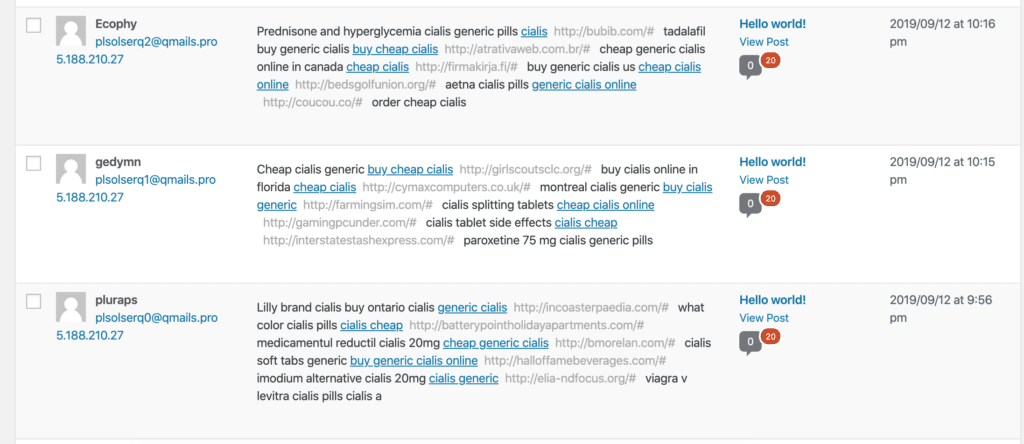
This is the sort of crap your site will be inundated with, without Akismet.
You see, unless you fancy being spammed with irrelevant trainer adverts on your blog about dog grooming, or have your Contact Form inundated with robots promising you business success with their one crazy SEO trick, or even to be told on your business email by a great relative you didn’t know you had that you have a million pounds inheritance to claim (if you’d only expedite the process by sharing your bank details), you’ll probably want Akismet installed.
Akismet is, like the rest of our list, a breeze to install and maintain. It’s completely free for personal websites, or a humble £4 per month if you’re using your website for business.
The irritation and inbox space it’ll save you from comment spam, however, makes it more than worth it. An excessive amount of irrelevant comments can harm your SEO, and even slow your website down by clogging up the space it holds.
Akismet is a sound investment to keep your site clear of the nasty stuff. As a website owner, you want to ensure that the notification for a new site comment or enquiry via your contact form is worthy of feeling just a little excited! Akismet can make it happen.
WRAPPING IT UP…

Hopefully, we’ve managed to convince you that these are the 5 plugins you’ll need on any WordPress website. There are a ton of other nice-to-haves, of course, but at Saint Digital, pretty much every WordPress site we’ll build will have these plugins in the back, keeping things safe, tidy, and functional.
As a website owner, you should always look to use the least amount of plugins you need to use to get the job done. Too many can slow down your site, or make it more vulnerable to hackers.
That’s why sticking with the essentials, you really can’t go wrong.
Happy with how your site is performing, or want to know where you stand in relation to your competition?
We’re here to help, if you need us.
GOT BIG IDEAS?
Need to step up your online marketing this year, with a water-tight plan to shoot up the rankings? Or perhaps your WordPress website isn’t converting as you’d like it to and you’re not sure how to pump up those online enquiry numbers. Gotcha – we’re here to help.
Whether you’re after a brand new web presence or just want to get an expert opinion on how your site is fixed against your competition, please use the form below to let us know of your grand designs and we’ll be back in touch to (hopefully) help make them happen.